

Six people at a table. Four have your number. Two don't.
You know the moment. Dinner's finished, the bill lands, and someone says they'll put it on their card and everyone can sort it out later.
So you open FareWeave, make a group, and start adding people. Three go in straight away — they're in your contacts. Then there's your friend's flatmate, who you met an hour ago. And the colleague from the other team who came along.
Now you're asking a near-stranger for their phone number, at a table, while the waiter waits. Or you're typing an email address into a phone with one hand. Or — and this is what usually happens — you give up, decide to sort the bill later, and end up doing the whole thing in a spreadsheet on Sunday.
The group was the easy part. Getting people into it was the problem.
Point your camera at the group
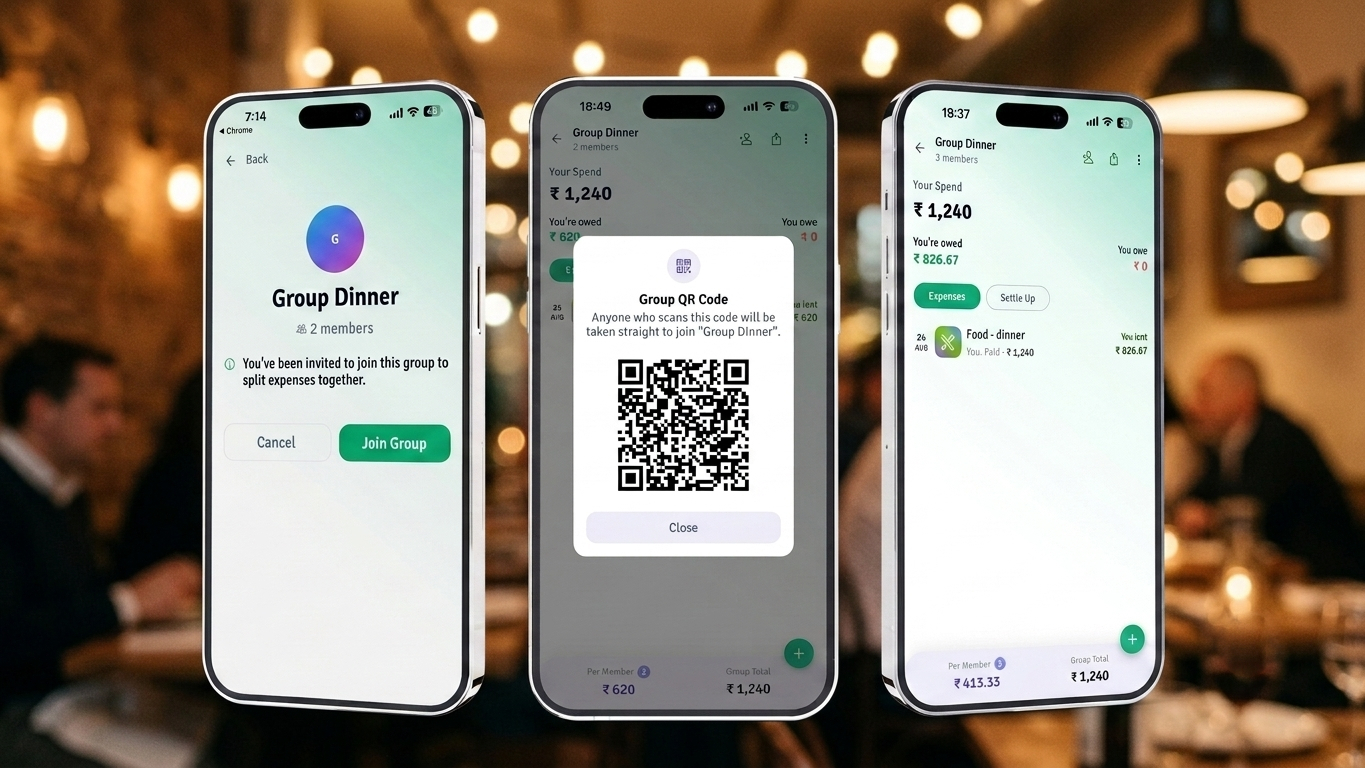
From today, any group admin can pull up a QR code. Anyone who scans it joins the group.
That's the whole feature.
No phone number. No username to search for. No invite link to send through an app you both happen to have. The person who needs to join points their camera at your screen and they're in — able to see the group's expenses, add their own, and settle up along with everyone else.
How it works
Create the group
Trip, dinner, house, whatever it is. Same as always.
Open the QR
From inside the group, open Group QR Code from the menu. The code appears full-screen and bright enough to scan from across a table.
They scan
Any camera works — the phone's own camera app, or the default scanner on most mobile devices. It opens straight into the group.
Done
They're a member. Their name shows up, they can add expenses, and The Weave includes them when it works out who pays whom.
The whole thing takes about as long as reading this sentence.
Why a QR code and not an invite link
We tried links first. They're fine, but they have a flaw that only shows up in the real world: a link needs a channel.
To send someone a link, you need a way to reach them — their number for a text, their handle on some app, a shared group chat. If you had that, you probably could have added them directly. The link doesn't solve the problem; it moves it one step along.
A QR code needs no channel at all. It travels through the air between two screens. The person joining doesn't need to give you anything, and you don't need to give them anything.
That matters more than it sounds, because a lot of shared expenses happen between people who aren't close enough to swap numbers — a colleague from another team, a friend of a friend on a group trip, the fifth person in a taxi.
It's also faster in the exact moment you need it. Nobody is unlocking a phone, finding a chat, pasting a link and waiting. Camera, point, in.
Where it actually earns its place
Group trips where the group isn't a friend group
Six people go, but they're three separate pairs who met once. Everybody scans on day one, and every taxi, hotel and dinner from then on goes into the same running tab.
Big dinners
Twelve people at a long table. Passing one phone down the row is faster than collecting twelve phone numbers.
Flatmate handovers
Someone moves out mid-year and someone new moves in. The new person scans once and inherits their place in the bills group.
Office trips and offsites
You don't have everyone's personal number, and you shouldn't need it to split a dinner.
Anyone who'd rather not hand over their number
Fair enough. Now you don't have to.
What we thought about before shipping it
A QR code that lets anyone join a group is convenient, and convenience is exactly where things go wrong. A group holds real numbers about real people's money, so we didn't want a code floating around that works forever.
- Only admins can generate a code. If you didn't create the group, you can't hand out access to it.
- Codes can be turned off. An admin can revoke a code at any point. Anyone who already joined stays; nobody new gets in with the old code.
- Admins can remove members. If someone scans who shouldn't have, take them out.
The small print, honestly
Joining a group means seeing the group. New members can see the group's expenses. That's what makes splitting work, but it's worth a second's thought before you scan someone in — the same thought you'd give before adding them by phone number.
Try it on the next one
Make a group. Tap share. Hold up your phone.
It's a small feature. But it removes the one step that most often stopped a group from getting created at all — and a group that never gets created is a bill somebody ends up eating.
Questions
Do I need a FareWeave account to scan?
Yes. If you're already signed in, scanning drops you straight into the group. If you're new, you'll be asked to sign up first — then you land in the group automatically.
Can I scan a code that was screenshotted?
Yes, while the code is still valid. Scanning a photo of a code works the same as scanning a screen — which is why codes expire and can be revoked.
What if the wrong person joins?
An admin can remove any member. Their share of any expense already recorded gets recalculated.
Does it work offline?
No. Scanning needs a connection to fetch the group and add you as a member, so make sure you're online before you scan.
Split your next one in seconds
Every group expense, woven into the fewest payments.